Two ways to get to Raven Evolve
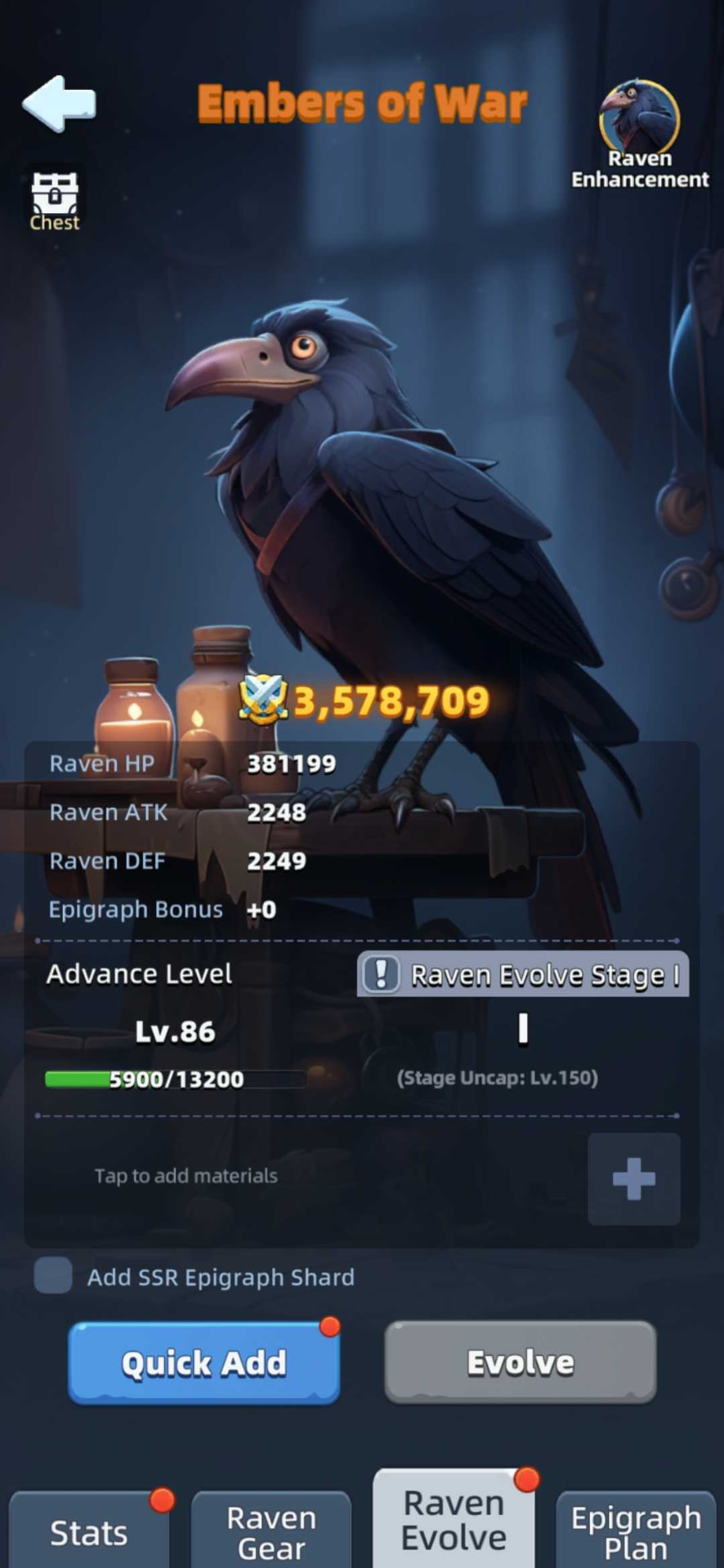
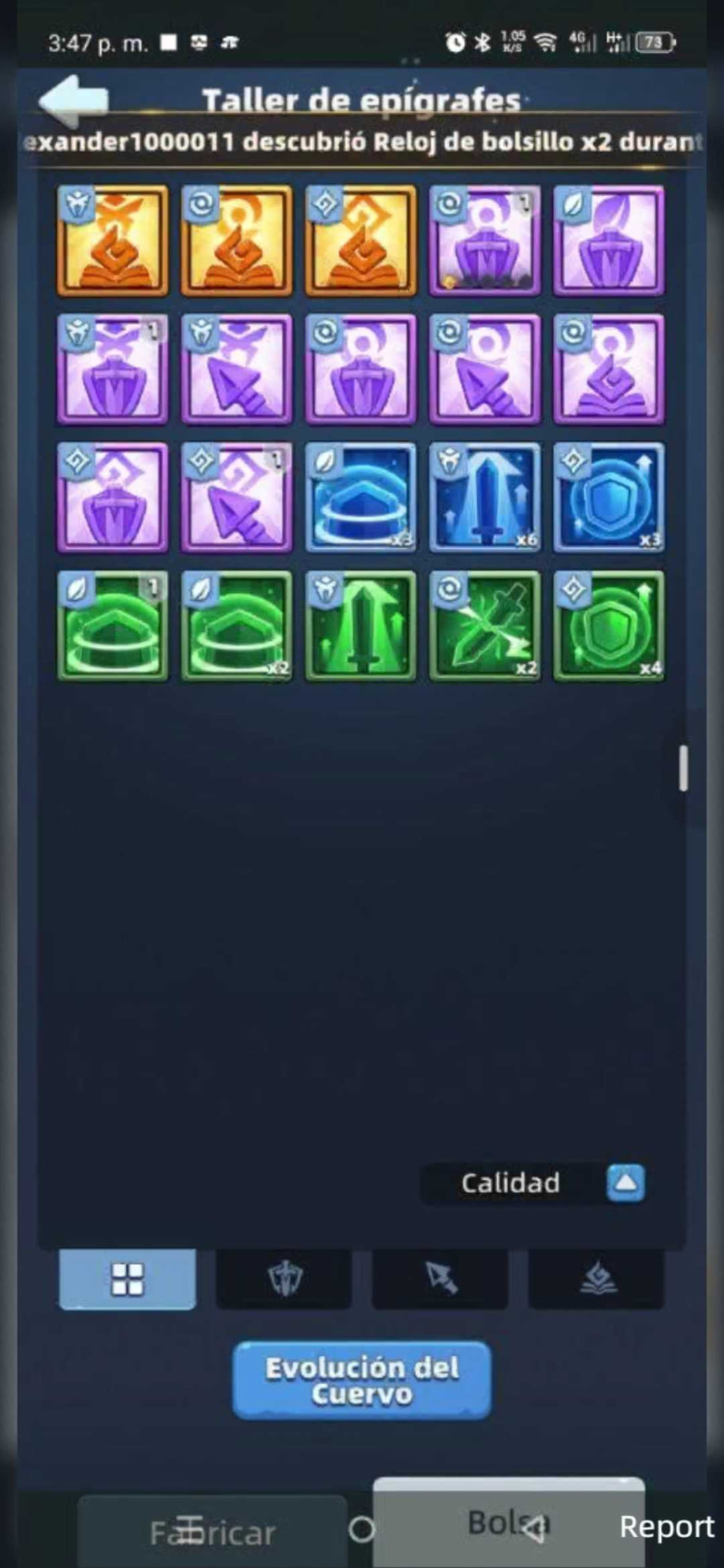
- There are two ways to open the Raven Evolve screen.
- 1. From the Raven Nest building: open the Raven Enhancement screen and select the Raven Evolve tab at the bottom (shown in the first picture, left).
- 2. From the Epigraph Workshop: open the Bag tab and tap the Raven Evolution button at the bottom of the screen (shown in the second picture, right — it is labeled Evolución del Cuervo in the screenshot).
- Both routes open the same Raven Evolve screen.
The Raven Evolve screen
- This screen shows where your Raven Evolution currently stands: the current Raven level (Lv.86 in the example), the EXP progress bar toward the next level (5,900/13,200), the Raven Evolve stage (Stage I, with its Stage Uncap level) and the Raven's stats and Might above it. The numbers are one account's example, not targets.
The Raven Evolve tab. In this example the Raven is at Lv.86 with 5,900/13,200 EXP, Stage I and a Stage Uncap of Lv.150. - To add materials, tap the + button next to “Tap to add materials”. This opens the selection screen so you can choose exactly which items to spend — the manual review this guide recommends.
- Do not use Quick Add. It selects materials for you automatically and may pick up valuable pieces; the section “Why manual selection is safer” below explains the risk. Always add with the + button instead.
Why manual selection is safer
- Quick Add automatically selects available materials. Its exact selection rules have not been confirmed here; inspect everything it chooses before accepting it. Do not assume valuable items are protected.
- The + button opens material selection so you can choose what to spend. NoT recommendation: use this manual review, especially when purple Epigraphs are available.
Watch a video on how to add epigraphs and guides to the Raven Evolve
Where to get the Raven Evolve Guide
- The supplied notes list the Raven Evolve Guide in the Alliance Shop at 1,980 Alliance Coins each. This is the only source named in those notes, not a guarantee that no other source exists or will be added. Check the live item name, price and stock before buying.
- Extra eligible Epigraphs can also provide Evolution EXP, but only spend pieces you do not need for a squad plan or promotion. Manual selection below helps protect useful copies.
Evolution stages, plans and System Boost
- This is the full progression reference. System Boost is shown as a separate milestone label, not a percentage or an extra plan; inspect its current effect in-game.
| Evolution level | Stage | Unlock / benefit |
|---|---|---|
| 10 | I | Epigraph System + Plan 1 |
| 150 | II | Epigraph Plan 2; Epigraph System Boost +1 |
| 300 | III | Epigraph Plan 3; Epigraph System Boost +2 |
| 450 | IV | Epigraph Plan 4; Epigraph System Boost +3 |
| 600 | V | No additional plan listed; Epigraph System Boost +4 |
| 750 | VI | No additional plan listed; Epigraph System Boost +5 |
Late-stage report — needs confirmation
- The new notes label Stage VII at Evolution level 800 and describe a Raven Might gain of over 2 million across levels 751–900. The stated range begins before the listed stage boundary, so this remains a reported observation rather than a confirmed unlock or guaranteed reward. Check the stage label and your own HP, ATK, DEF and Might preview before planning around it.
Step by step
- 1. Open the Raven screen and choose Raven Evolve.
- 2. Tap + beneath the Evolution progress bar and review available materials.
- 3. Select Raven Evolve EXP books first, then surplus green and blue Epigraphs you no longer need.
- 4. Review any purple item individually. Check whether it fits a plan or is a matching promotion duplicate before selecting it.
- 5. Check quantities and the total EXP preview, confirm your selection, then tap Evolve. Read the final confirmation before consuming anything.
Read the selection screen carefully
- The supplied screenshot notes show book quantities 0/5 and purple item quantities 0/2, 0/1 and 0/1. Treat these as a description of that example, not your current inventory. Check the screen’s own selected/available labels to confirm their ordering.
- Purple icons represent items worth inspecting. Red exclamation marks draw attention, but their exact meaning is not established by the notes; open the item description.
- Do not enable Add SSR Epigraph Shard until its preview makes clear exactly what is consumed. The notes do not establish whether it selects finished items, crafting shards or both. Keep valuable crafting materials and promotion duplicates.
- Gold UR Epigraphs are not listed as eligible Evolution materials. Confirm eligibility in your current selection screen; do not treat gold items as disposable.
Worked EXP example — not your live stats
- Yuriya’s supplied notes describe Evolution level 86, stage I, 5,900 / 13,200 EXP. That leaves 7,300 EXP to level 87.
- The same example records Raven HP 381,199; ATK 2,248; DEF 2,249; Might 3,578,709. These are one account’s snapshot, not targets or guaranteed rewards. Material EXP values still need checking in the game preview.